
Integrating a smart AI chatbot is one of the fastest ways for Magento merchants to lower overhead and increase conversion rates. But where do you start? From choosing the right provider to technical deployment, here is your step-by-step roadmap to launching a chatbot that delivers results.
Why your Magento store needs an AI chatbot
Magento powers some of the world’s largest e-commerce automation operations, but even the best storefronts can’t staff a support team around the clock. An AI chatbot fills that gap — answering product questions, processing order status requests, and guiding shoppers to checkout, 24/7.
- Instant responses
- Resolve FAQs and order queries in seconds, not hours.
- Higher conversions
- Guide undecided shoppers toward the right product and reduce cart abandonment.
- Lower support cost
- Deflect repetitive tickets, so your team focuses on complex issues.
Choose your AI chatbot for Magento platform
Before writing a single line of code, decide which platform fits your requirements. Key factors to evaluate include native Magento integration for e-commerce platform, support for custom training data, conversational AI quality, and pricing model.
- Tidio
- Gorgias
- Intercom Fin
- Freshchat
- Custom (OpenAI API)
- Zendesk AI
Set up your Magento environment
A clean, well-configured Magento environment is the foundation. Before proceeding, ensure the following are in place:
- Magento 2.4.x installed (cloud or on-premise)
- Admin API access enabled with appropriate scope
- HTTPS enforced site-wide (mandatory for third-party widget trust)
- Composer and CLI access for module installation
- Staging environment ready for pre-live testing
Install & configure the chatbot
Installation method depends on your chosen platform. For a Composer-based Magento module (typical for self-hosted or custom solutions), the flow looks like this:
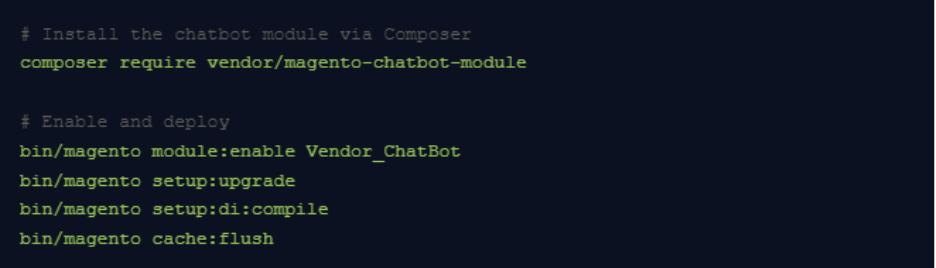
For SaaS platforms (Tidio, Gorgias etc.), you’ll typically paste a JavaScript snippet into your Magento theme’s default_head_blocks.xml or use their dedicated Magento extension from the Marketplace.
Connect to Magento data sources
The real power of an AI chatbot comes from connecting it to live Magento data — product catalogue, inventory, customer orders, and promotions. Use Magento’s REST or GraphQL API to expose these data sources to your chatbot backend.
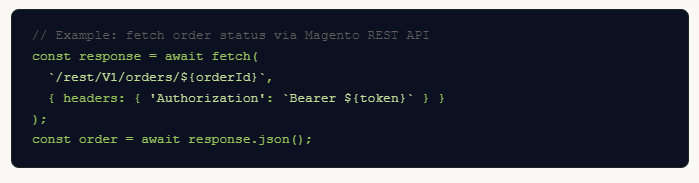
Pipe this data into your AI chatbot’s context so it can answer “Where is my order?” questions with real-time accuracy rather than canned responses.
Train the bot on your catalogue
Upload your product descriptions, FAQs, shipping policies, return policies, and brand tone-of-voice guidelines to your chatbot’s knowledge base. For LLM-backed bots, this usually means creating a vector store or retrieval-augmented generation (RAG) pipeline.
- Export product data as structured JSON or CSV
- Chunk and embed documents into a vector database (e.g. Pinecone, pgvector)
- Write a system prompt that defines bot persona, scope, and escalation rules
- Schedule nightly re-indexing to keep catalogue data fresh
Test before you go live
Never push directly to production. On your staging environment, run through these scenarios systematically:
- Product search and recommendations
- Order tracking with real and dummy order IDs
- Returns and refund policy queries
- Edge cases: out-of-scope questions, abusive input, language switching
- Mobile responsiveness of the chat widget
- Page load performance impact (target: <200ms additional LCP)
Monitor, optimise & scale
Going live is the beginning, not the end. Track these metrics weekly to continually improve bot performance:
- Resolution rate — % of conversations resolved without human handoff
- CSAT score — post-conversation satisfaction rating
- Conversion lift — sessions with chatbot vs. without
- Fallback rate — how often the bot says “I don’t know”
- Top unanswered intents — feed these back into training data
As confidence grows, expand the bot’s scope: proactive cart-abandonment nudges, upsell recommendations at checkout, post-purchase follow-up flows, and multilingual support for new markets.
Ready to build your Magento AI chatbot?
Our team at Fermion Infotech specialises in custom AI integrations for e-commerce platforms. Whether you need a quick SaaS setup or a fully bespoke RAG-powered assistant, we can help you ship it fast.